Thursday, 21 August 2008

Look at me. I'm on TV

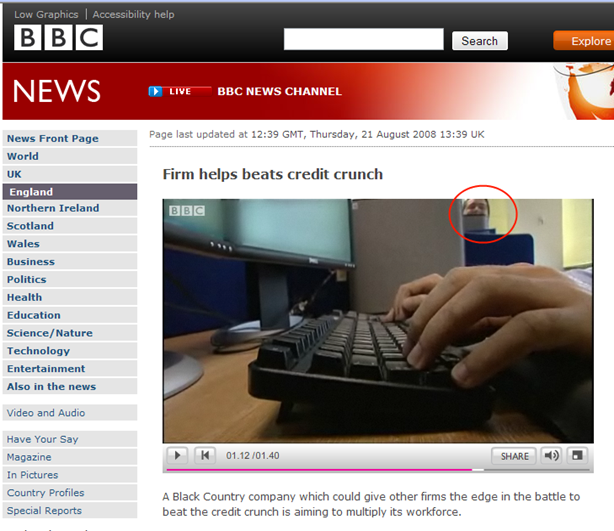
We had a film crew from our regional BBC TV station come into the office on Tuesday. Their piece was aired at lunchtime today, and you can also see it on the BBC website . They focus on the need we have to recruit more people. We've already had one response from a lady who heard that we need people skilled in Mathematical Modelling. She rang to say that her daughter had a maths degree, and was really good with Lego, and did we have a job for her?

Look out for me. I'm the one you see peering over a partition whilst the fingers of my colleague Jason type gibberish into Visual Studio. I wasn't trying to get in shot. Honest!VideoScreenGrab

Which .Net Excel IO Component should I use?

Introduction

When I wrote up my post about the ways of interacting with Excel from .Net I listed a number of .Net components that can be used for reading and writing native Excel files; I left you with the hard task of picking one for yourself. Today I'm going to write you a helping hand.

Over the last couple of days I've been doing some bug fixing on a little utility we have that analyses an Excel spreadsheet and creates named ranges for cells that are formatted in particular styles. The biggest bug I wanted to fix was terrible performance. When I first looked at the application a couple of months ago the performance was unbelievable: never mind making a cup of coffee whilst it did its stuff; we could go home and get a good nights kip before it delivered the results. It didn't take long to pin most of the blame for that on Excel COM Interop: each call to a property or method on a COM object has a significant overhead, and we were querying the Style property of each cell in a 120Mb workbook!

Hence my interest in .Net components for loading Excel files: I had a license to Syncfusion XlsIO available, and by switching the code to use that instead of Excel Automation through COM, the time to query cell styles dropped to almost nothing. However, XlsIO has some performance issues of its own (more on these in a moment), and it still could take up to an hour for the whole operation to complete. So I decided to have a look at the other components in the market place.

In the hope that there will be at least one other person on the web who finds this useful, I'm recording my first impressions of several of these Excel IO components. I'm not claiming that these are objective reviews: your kilometreage will almost certainly vary.

Syncfusion XlsIO

I've been using XlsIO on and off for a couple of years. Mostly, it has helped me get the job done; several times it has been the cause of temporary localised baldness. My thoughts:

  • It has an API that covers the vast majority of Excel features
  • The API is mostly consistent with the Excel COM API, though there are several exceptions to catch you out: Workbooks.Add vs Worksheets.Create being one trivial example.
  • There are some highly non-trivial differences from the Excel COM API. For example, the Excel Range object has Rows and Columns properties that return references to collections; the XlsIO Range object has properties with the same names, but each return arrays of Range objects and allocate a new array every time you access the property. This is a huge performance pitfall for the unwary.
  • The Range model is different to Excel's in that in XlsIO, a Range can only contain one Rectangular region, whereas excel allows Ranges to be created that are the union of many rectangular regions.
  • As I hinted in the introduction, there are other performance problems. In my large (120Mb) workbook, deleting a single row could take up 20 seconds. Deleting Named ranges was another costly operation. Excel demonstrates that these operations don't have to take that long.
  • The documentation is sparse, to put it politely, and the class reference often doesn't state more than the obvious. "ICombinedRange: represents a Combined Range" being one typical example. I have however had assurances from Syncfusion that they are working to improve this.

XLSReadWrite

I started my exploration of other components by downloading and installing XLSReadWrite. Then uninstalling it again. Call me a CLR snob, but I didn't like the thought of working with a component that is clearly designed for Delphi. This showed because the API commits two capital crimes: Every type in is prefixed with a T; and most of the namespaces contain just one type. The other point to note about XLSReadWrite is that the "shape" of the API is nothing like Excel's so any code you have using COM Interop would need a lot of reworking to use this component.

ActiveXLS

I'm afraid that CLR snobbishness also put me off ActiveXLS. The ActiveXLS team produce Spreadsheet components for both .Net and Java, and it appears that the .Net version is a straight port of the Java version: it is the paired "get_" and "set_" methods, and the absence of Properties that give the game away. Surely an organisation selling a component "optimised for Visual Studio" (as the home page claims) should make .Net developers feel at home and at least use Pascal casing for methods, rather than camel casing (which everybody knows should only be used for method parameters)?

The other thing that struck me as odd was that in the ActiveXLS forums (which have been active since 2006) there have only been about 200 posts. Is it that they have an intuitive API with superb documentation: or perhaps a very small user-base? Maybe I'm just cynical.

SpreadsheetGear

SpreadsheetGear was the component I finally settled on. This appears to be far and away the most mature (though correspondingly the most expensive) of the components that I looked at. Though I didn't try that part of it, this component also offers Windows Forms controls for editing spreadsheets. My impressions:

  • The Object model is very similar to Excel's, and easy to learn. It didn't take me long to port my code from XlsIO (which is also similar to Excel).
  • One big inconsistency is that properties giving access to cells use a 0-based index system rather than the 1-based system in Excel.
  • The Range model is (as far as I can tell) identical to Excel's. Intersect and Union methods are provided for Ranges and seem to work as I'd expect.
  • There's a surprising omission in the API in the current version (2007): no support for Styles. If you need style support you'll need to get the 2008 version (currently in beta).
  • All the non-public code is obfuscated. This can cause problems when debugging. For example when I was trying to look at the Workbook.Names collection in the Quick Watch window (VS 2008) I expanded one of the Name items in the collection, but was unable to inspect any of its properties. It was only by rewriting the expression in Quick Watch window to include a cast to IName that I could see the property values.
  • SpreadsheetGear do not have any public forums that I could find: the only way to get support is to fill in a form and wait for them to get back to you.
  • Performance of the component was very good. Remember the application that took all night with COM Interop, and up to an hour with XlsIO? It now takes under a minute with SpreadsheetGear.
  • As a bonus, here's the answer to an issue that took me an afternoon to figure out (and has caught me out again since then). When you supply a Range address to an IName (whether by using Names.Add or IName.RefersTo) remember to prefix it with an "=" sign; otherwise the IName.RefersToRange property won't get updated.

Honourable Mentions

  • I tried contacting Independentsoft about Spreadsheet.Net but never received a link to the evaluation download. I would judge by the website that this component isn't going to be as complete or mature as the others.
  • Gembox Software offer a completely free version of their spreadsheet control, limited to 5 worksheets of 150 rows each. Unfortunately they don't seem to offer an evaluation version of the full product, so I wasn't able to try it out on my big workbook. A quick scan of the online help shows that the API is not dissimilar to Excel's, and does follow the .Net framework design guidelines.
  • FarPoint Spread does Excel import and export, but its focus is on providing a spreadsheet-like Grid component, so I didn't look into this any further.
  • Infragistics have Infragistics.Excel but it looks like it can only be purchased as part of one of their suites. From the documentation, it doesn't look as fully featured as either XlsIO or SpreadsheetGear.
  • ComponentOne is another component suite vendor that has lumped an Excel IO component in with their suite. Again, the documentation shows that it has fairly limited capabilities compared with the leaders.
  • Aspose.Cells is a component that appears, by my reading of its documentation, to sit somewhere in the middle of the market, in terms of functionality and price. Aspose is a vendor that sells components for .Net and Java. and gets it right: the API's are "localised" for the framework culture. The .Net API gets Properties and Pascal cased methods, and the Java API keeps its get and set methods.

Tuesday, 19 August 2008

Pre-boarding IQ test

I've not seen this before: requiring passengers to solve a Linear Programming exercise to determine whether they and their buggies are allowed to board the bus:

Confusing signs on Bus

Friday, 15 August 2008

Sudden Onset Digital Amnesia

On Monday a faithful servant of mine was diagnosed with a very serious illness. It was quite distressing.

I first noticed something was wrong when I went to wake him from Sleep last week. He groaned and made grinding noises rather than his usual cheerful whirs and beeps. No shimmering pearl appeared on his visage; instead the room filled with a smoky odour, and his face remained black.

I phoned the doctor as soon as I could. He came to the house and was soon examining the patient, not with stethoscope, but with digital voltmeter. It told a tale of voltage fluctuations on the motherboard well outside the usual range. This case called for immediate hospitalisation and an operation.

After successful surgery to transplant the power supply, things seemed to be looking up. Many vital signs were testing positive as the doctor went over them, one by one. Then he came to the DVD drive: no sign of life. He fiddled with cabling, and tested again. Nothing. A check of one of the DIMM slots revealed that that too had suffered. But then he made the worst discovery of all.

It was the Primary SATA drive. Dead. Infectiously dead in fact, because, when hooked up to the motherboard it drained life from the whole of the system. With that disconnected however, one bootable hard drive remained to my servant, allowing him to hobble to life again. And thus the diagnosis was made: Sudden Onset Digital Amnesia.

He is home again now, but a shell of his former self. Reduced from his hardware-accelerated, Composited Desktop, Windows Vista glory to Windows XP and GDI graphics; his precious photographic memories of my holidays and special family moments mostly gone; no longer holding any record of my financial accounts; unpublished Project Euler solutions passed away into the digital ether.

He says nothing, but sits with a reproachful air. Why was I not backed up? No RAID. No copying to optical media. Not even an online backup. And so I write, that his suffering might not be in vain, and that you might share in the moral of his story.

The Moral of the Story

So to me has happened one of those things which I always assumed happened only to other people. I had planned to make backups. I even had a box of TDK scratch proof DVD's on the shelf to hold the backups. But somehow it never seemed a top priority. Now I know better.

But I'm an optimist by nature, and things are not as bad as they could be. It was the photos from early 2007 onwards that were held on the disk that went down, but some of the best of those I've put on my daughter's blog. On the disk that remains I have everything prior to 2007. Getting that backed up is now a top priority.

A couple of weeks back I read (via Jurgen Appelo) about Mozy, the online Backup Service. The idea of online backups is too take all the hassle and risk out of the job. You install a piece of software on your computer; it monitors your disks for changes, and sends updated files to be stored somewhere in the cloud. No worries about what to store your backups on; no need to find a secure off-site storage location. It's all handled for you.

In all the reviews of competing Online Backup systems I've looked at MozyHome has consistently come out top, so I signed up. They have a free version that gives you 2GB backup space, but for only $4.95/month per computer (less if you take out yearly or two yearly subscriptions) you get unlimited space on their servers.

I've not used Mozy much yet, but so far this is what I've learnt about it:

  • You can backup entire folders, or you can ask Mozy to look for files matching particular criteria (file type, size, etc.)
  • All files are encrypted before being sent over the wire. You can choose your own key, or leave Mozy to take care of that. This adds security, but does have the downside of making Mozy backups take longer than some competitors
  • You can control how much bandwidth and CPU power Mozy takes up for the backup process, and schedule when backups should happen.
  • Mozy performs incremental block-level backups, only resending files or parts of files that have changed.
  • There are plenty of options for getting your files back again: there's Windows Explorer integration, a web-download option, or even an option to have your data put on DVD and posted to you (for an additional charge)

Unless you have the patience of a saint, and feel no particular urgency to get backed up, you'll need a Broadband Internet connection to make this happen, preferably one with very high download caps. But who doesn't have one of those these days?

And what about my other disk, and all those lost digital memories? I could pay to have it recovered professionally, but prices start from around £250. So I've decided to put that money towards a new laptop instead - that way I can compute downstairs, rather than tucked away in the spare bedroom, and maybe my wife will feel less of a computer widow. And sometime in the future, when all my remaining data is safely stashed away, in all the spare time I don't have, I'll have a hack at the disk myself.

Footnotes and Postscripts

  1. MozyHome Reviews:
  2. A variation of Online Backup: CrashPlan. The idea is to pair up with a friend who has a computer someplace else, and then use CrashPlan's software to mutually backup each others data over the Internet. The main benefit appears to be the absence of Monthly fees.