Friday, 18 July 2008

Random Pastel Colour Generator

One of the nice things about WPF is that it sets us free from the world of "battle-ship gray" that is Windows Forms and Win32, and lets us enter the promised land of glorious technicolored, gradient-filled User Interfaces with all kinds of fancy typography and bouncy animated buttons.

Of course, with great power comes great responsibility not to offend users' sensibilities with garish colour schemes. For artistically challenged developers there are sites like Kuler that help with composing tasteful colour schemes1. And now there's my offering.

This is something that a colleague (hi Simon!) and I put together when we were developing a WPF chart control back in the days of .Net 3.0 beta 2. We wanted to be able to generate charts with randomly coloured series, avoiding the horrible mishmash of colours with which Excel paints its charts. We came up with a random pastel colour generator.

The principle is quite simple. You just need to observe that, in the RGB colour model pleasing pastel palettes pop out when you pick red, green and blue values fairly close to each other in the middle of the range 0-256. It generates results like this:

Pastel Colours 1

and this:

Pastel Colours 2

Here's the code (in C#)2:

using System;
using System.Windows.Media;

/// <summary>
/// Provides a range of tasteful random pastel colors
/// </summary>
public class RandomPastelColorGenerator
{
    private readonly Random _random;

    public RandomPastelColorGenerator()
    {
        // seed the generator with 2 because
        // this gives a good sequence of colors
        const int RandomSeed = 2;
        _random = new Random(RandomSeed);
    }

    /// <summary>
    /// Returns a random pastel brush
    /// </summary>
    /// <returns></returns>
    public SolidColorBrush GetNextBrush()
    {
        SolidColorBrush brush = new SolidColorBrush(GetNext());
        // freeze the brush for efficiency
        brush.Freeze();

        return brush;
    }

    /// <summary>
    /// Returns a random pastel color
    /// </summary>
    /// <returns></returns>
    public Color GetNext()
    {
        // to create lighter colours:
        // take a random integer between 0 & 128 (rather than between 0 and 255)
        // and then add 127 to make the colour lighter
        byte[] colorBytes = new byte[3];
        colorBytes[0] = (byte)(_random.Next(128) + 127);
        colorBytes[1] = (byte)(_random.Next(128) + 127);
        colorBytes[2] = (byte)(_random.Next(128) + 127);

        Color color = new Color();

        // make the color fully opaque
        color.A = 255;
        color.R = colorBytes[0];
        color.B = colorBytes[1];
        color.G = colorBytes[2];

        return color;
    }
}

Footnotes

  1. Here's a list of other colour-scheme generators.
  2. If you've not entered the promised land of WPF, it shouldn't be too hard to convert this to Windows Forms lingo. I'll leave that as an exercise to the reader...

Tuesday, 15 July 2008

Project Euler Problem 15: City Grids and Pascal's Triangle

Problem 15 in the Project Euler series asks us to count the number of routes through a 20x20 grid starting from the top left and travelling to bottom right, always moving either rightwards or downwards, never backtracking. I can give you the solution in one line of code; explaining why it is the solution will take me many more lines of prose. The solution is:

return PascalsTriangle.GetEntry(2*20, 20);

(OK, you caught me: PascalsTriangle isn't a C# primitive type, so I guess I'll have to give some code for that as well. But all in good time.)

So what does Pascal's triangle have to do with City Grids? This is one of the things that I love about mathematics: seemingly unrelated problems often have subtle and beautiful connections. The connections are completely hidden on the surface, but once you uncover them, link at a time, you wonder that you never spotted them immediately.

How should we go about counting the number of routes through the grid? Here, try with this smaller grid - take my copy and scribble on it all you like:
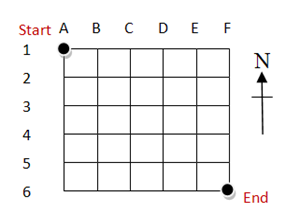
A 6x6 city grid

My first insight was to start counting, not at the start of the grid, but at the end. Rather than try to work out all the possible routes from the starting point, let's count how many routes there are from points near the end, then work backwards.

Let me show you.

How many routes are there from the point F6 (marked "End") to the same point, F6? Stupid question, obvious answer: one - just follow the complicated directions: "Stand Still". From F5 to F6 there's one route: "Go South one block". From E6 to F6, one route: "Go East one block". But if I'm stood at E5 and want to get to End I have two choices, I can either go "East one block, then south one block" or "South one block, then East one block".

In fact, from anywhere along column F there's only one route to the end ("Go South x blocks"), because we're not allowed to turn back west; and from anywhere along row 6 there's only one route ("Go East x blocks") because we're not allowed to turn up north. On the diagram I've drawn what we've got so far - blue shows the number of routes from each point:
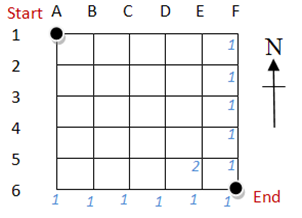
CityGridv3

Now lets consider how to find the number of routes from other spots on the grid. Take E4, for example. If we go east to F4 then we already know that there's only one way we can go on from there. If, however, we go south one block to E5 then we know that there are two routes we can take from there. So this makes a total of three possible routes from E4. By the same argument, we can see that there are 3 possible routes from D5. Then we can apply the same reasoning to cell D4: three possible routes if we go east to E4 plus three possible routes if we go south to D5 make for a total of 6 ways to get from D4 to the end. Another diagram to summarise:
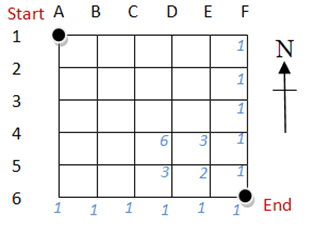
CityGridv4

You see the way this is going now, don't you? To work out the total number of routes from each intersection we add up the total number of routes from the intersections one block to the east, and one block to the south.

Now lets spin the grid about its centre to put the point marked End at the top, drop the gridlines, and write out the numbers by themselves. Like this:

PascalsTriangle

What have we got? Pascal's Triangle - a fascinating mathematical object d'art that has been rediscovered many times throughout history in many different contexts. (Wikipedia will be delighted to tell you more about it- there's more to it than meets the eye). You construct it by writing 1s down the diagonal edges of the triangle, then forming each cell by summing the two neighbours in the row above.

I've highlighted the cells in red, because they are the ones that particularly concern us. Imagine spinning the triangle back so that it aligns with the grid. Then you see that "2" is the number of routes through a 1x1 grid, and "6" is the number of routes through a 2x2 grid.

Let's label the cells of the grid. Call the apex of the triangle row 0, and call the first "1" on each row column 0. Thus the number of routes through a 1x1 grid appears in row 2, column 1; the number of routes through a 2x2 grid appears at row 4 column 2. From there we can take a flying un-mathematical leap to a conclusion and say that the number of routes through an n x n grid will appear in row 2n, column n of Pascal's Triangle. That explains my solution: obvious now?

But how to calculate the number in that cell? My first thought was to write code that builds the triangle row by row. But there's a quicker way. Using Proof by Wikipedia, we can show that P(r,c) = ((r + 1 - c) / c) * P(r, c - 1), where P(r, c) is the value of Pascal's triangle at row r, column c. In other words, to calculate the value of a cell at column, c, in a particular row, r, we multiply the value of the cell to the left by the fraction (r + 1 - c) / c.

A sequence defined recursively like that makes me think of the Unfold method for generating it. Remember that after you have given it a seed value, Unfold generates a sequence for you by applying the lambda you give it to the previous term in the sequence. So our mathematical definition becomes:

public class PascalsTriangle
{
    public static long GetEntry(int row, int column)
    {
        // the L suffix on "Entry = 1L" is to force Entry to have a long type
        return Functional.Unfold(new {Entry = 1L, Column = 1},
                                 previous =>
                                 new
                                     {
                                         Entry = (previous.Entry*(row + 1 - previous.Column))/previous.Column,
                                         Column = previous.Column + 1
                                     })
            .SkipWhile(item => item.Column <= column)
            .First()
            .Entry;
    }
}

Note the use of the anonymous type to pass an additional piece of information through to the next iteration: Entry holds the cell value, and Column holds an incrementing count of the number of columns that we've calculated.

For reference, here's equivalent code that uses looping rather than functional concepts:

public static long GetEntry(int row, int column)
{
    long current = 1;

    for (int i = 1; i <= column; i++ )
    {
        current = (current * (row + 1 - i)) / i;
    }

    return current;
}

The complete code is shown below, and can also be downloaded from my Project Euler on the MSDN Code Gallery.

[EulerProblem(15, Title = "Starting in the top left corner in a 20 by 20 grid, how many routes are there to the bottom right corner?")]
public class Problem15
{
    public long Solve()
    {
        return PascalsTriangle.GetEntry(2*20, 20);
    }
}

public class PascalsTriangle
{

    public static long GetEntry(int row, int column)
    {
        // the L suffix on "Entry = 1L" is to force Entry to have a long type
        return Functional.Unfold(new { Entry = 1L, Column = 1 },
                                 previous =>
                                 new
                                     {
                                         Entry = (previous.Entry * (row + 1 - previous.Column)) / previous.Column,
                                         Column = previous.Column + 1
                                     })
            .SkipWhile(item => item.Column <= column)
            .First()
            .Entry;
    }
}

public static class Functional
{
    public static IEnumerable<T> Unfold<T>(this T seed, Func<T, T> generator)
    {
        // include seed in the sequence
        yield return seed;

        T current = seed;

        // now continue the sequence
        while (true)
        {
            current = generator(current);
            yield return current;
        }
    }
}

Monday, 14 July 2008

Using IDisposable - don't feel guilty about 'hijacking' it!

Jason Bock links to my post on (Mis)Using IDisposable (with some kind words about the "cool content" on the rest of blog - thanks Jason!), and says that he sometimes feels "a little guilty about using IDisposable for something other than managing unmanaged resources". I guess the title of my post did suggest that I was encouraging others to indulge along with me in some slightly naughty behaviour.

But nothing so underhand is going on. Eric Gunnerson, previously on the C# design team, has said 

we decided to name it “using” rather than something more specific to disposing objects so that it could be used for exactly this scenario.

So, Jason, we all have the highest authority to (mis)use using and IDisposable for purposes beyond resource clean-up.

Thursday, 10 July 2008

Cancelling Long-running LINQ queries

Last time you dropped by, we were discussing how that polite software should tell its users how it's getting on with the tasks it has been set - it should give progress reports; I showed how to implement progress reporting in LINQ queries. Now the book of software etiquette also says (on page 214, but you'll have to trust me on that because I've got the only copy - stored in my imagination) that well mannered programs should allow their users to cancel very long running tasks.

When I was new to the .Net framework, and hadn't read around much, I was inclined to think that the best way of supporting cancellation is spin up a new Thread, do the work there and, if the user should press "Cancel", pull the trigger on the Thread using Thread.Abort(). But as Ian Griffiths explains, Thread.Abort() is a nuclear option that you should only invoke if you're prepared to deal with the radioactive fallout afterwards - by which I mean the inconsistent state that the ThreadAbortException generated by Thread.Abort() can leave in its wake as it goes about terminating your thread. If you want to stop your program in its tracks without damaging the environment you should use a good old-fashioned bool flag that one thread can set and the worker thread can check periodically to see whether it should break out of its current job.

But when we're using LINQ expressions, with nary a loop in sight, how can we periodically check that flag?

Remember the pipeline analogy I used of LINQ queries last time? There we talked about introducing flow meters to observe the number of elements passing through the pipe - that idea led to the progress reporting we needed. Well, the other thing every sensibly-constructed pipeline has are valves that can shut the whole operation down: that's just what we want to support cancellation. The idea is that, when we hear that we need to cancel, we starve the LINQ query of any further items so that it terminates early.

As before, we can implement this LINQ "valve" using an Extension method containing an iterator that just pulls items from the input sequence on the left and passes them through to the output sequence on the right, but crucially calls a delegate after every item to ask whether it should carry on or cut the output sequence short; we can even combine this technique with the one from last time to support reporting progress.

Also as before, I've provided two versions of this extension method: one that buffers the input collection in order to count it, and one that doesn't buffer it - but does require you to tell it how many elements there will be.

public static IEnumerable<T> AsCancelable<T>(this IEnumerable<T> sequence, Func<int,bool> shouldCancel)
{
    if (sequence == null) { throw new ArgumentNullException("sequence"); }

     // make sure we can find out how many elements are in the sequence
     ICollection<T> collection = sequence as ICollection<T>;
     if (collection == null)
     {
        // buffer the entire sequence
        collection = new List<T>(sequence);
     }

     long total = collection.Count;
     return collection.AsCancelable(total, shouldCancel);
}

public static IEnumerable<T> AsCancelable<T>(this IEnumerable<T> sequence, long itemCount, Func<int, bool> shouldCancel)
{
    if (sequence == null) { throw new ArgumentNullException("sequence"); }

    long completed = 0;

    foreach (var item in sequence)
    {
        yield return item;

        completed++;
        bool cancel = shouldCancel((int)(((double)completed / itemCount) * 100));
        if (cancel) { yield break; }
    }
}

To provide an example of how you might use this, I've applied AsCancelable to a slightly modified version of my solution to Project Euler Problem 4. To make the code run for longer (to give us an opportunity to cancel it!), I've changed it to find the largest palindrome that is a product of two 4 digit numbers (Problem 4 was about two 3 digit numbers).

public void TestCancellableProgressReporting()
{
    bool cancelled = false;

    Func<int, bool> progressController = percent =>
                        {
                            Console.SetCursorPosition(1, 0);
                            Console.WriteLine(percent + "%");
                            Console.WriteLine("Press 'c' to cancel");
                            cancelled = (Console.KeyAvailable && Console.ReadKey(true).Key == ConsoleKey.C);
                            return cancelled;
                        };

    var largestPalindrome =
                        (
                        from long x in 1000.To(9999).AsCancelable(progressController)
                        from long y in 1000.To(9999)
                        let product = x * y
                        where product.IsPalindromic()
                        orderby product descending
                        select product
                        )
                        .FirstOrDefault();
    if (!cancelled)
    {
        largestPalindrome
            .DisplayAndPause();
    }
    else
    {
        "Calculation Cancelled".DisplayAndPause();
    }
}

A couple of things to note about this:

  • You need to make sure your LINQ query is prepared for the starvation it might face. In the original solution to Problem 4 I used a call to First() rather than FirstOrDefault() at line 23 (the difference being that First() throws an exception if it doesn't find any elements in the sequence, whereas FirstOrDefault will return the default value for the sequence type - 0 in this case). That was fine in the original context, because there were always elements in the sequence. When we use AsCancelable however, the sequence might be terminated before any elements have been passed through
  • You need to be sure to ignore the result of the query if it has been cancelled. This is obvious really, but I nearly forgot when writing the sample. In this case largestPalindrome will always be assigned a value, but only when we don't cancel the query will it be a valid value.
  • AsCancelable will only work in expressions where we are directly processing sequences - ie when the data source is IEnumerable rather than IQueryable. It will not work with LINQ to SQL for example, because LINQ to SQL translates the expressions you give it to SQL statements which clearly don't support cancellation! You might want to check out AsEnumerable in this context.
  • You might also want to note in passing the way to read input from the Console without blocking: check Console.KeyAvailable first!